Skip to content
NewTexts back in your customer's language, day or night

Run the job. Get your day back.

Missed calls and texts answered and booked. Estimates built while you talk. Invoices that chase their own payment. Your crews stay on the tools, not on the phone.

  • 14-day free trial
  • No card needed
  • Bring your customers from Housecall Pro or Jobber
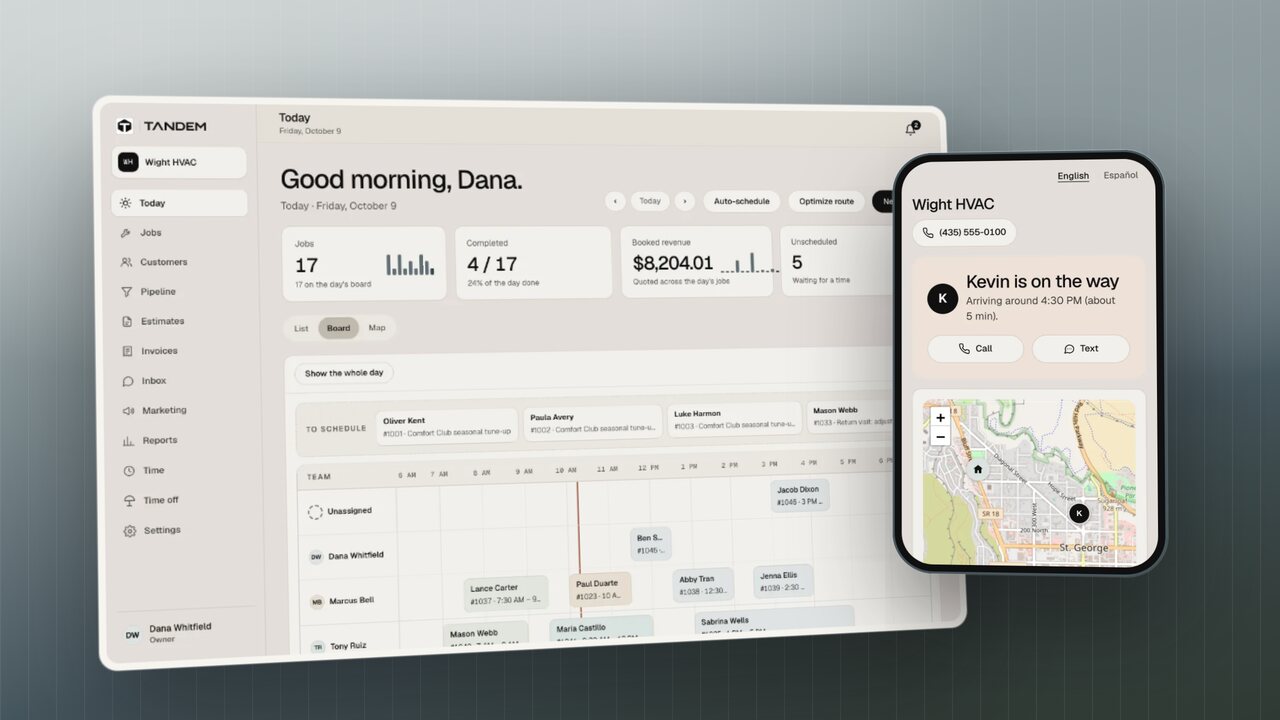
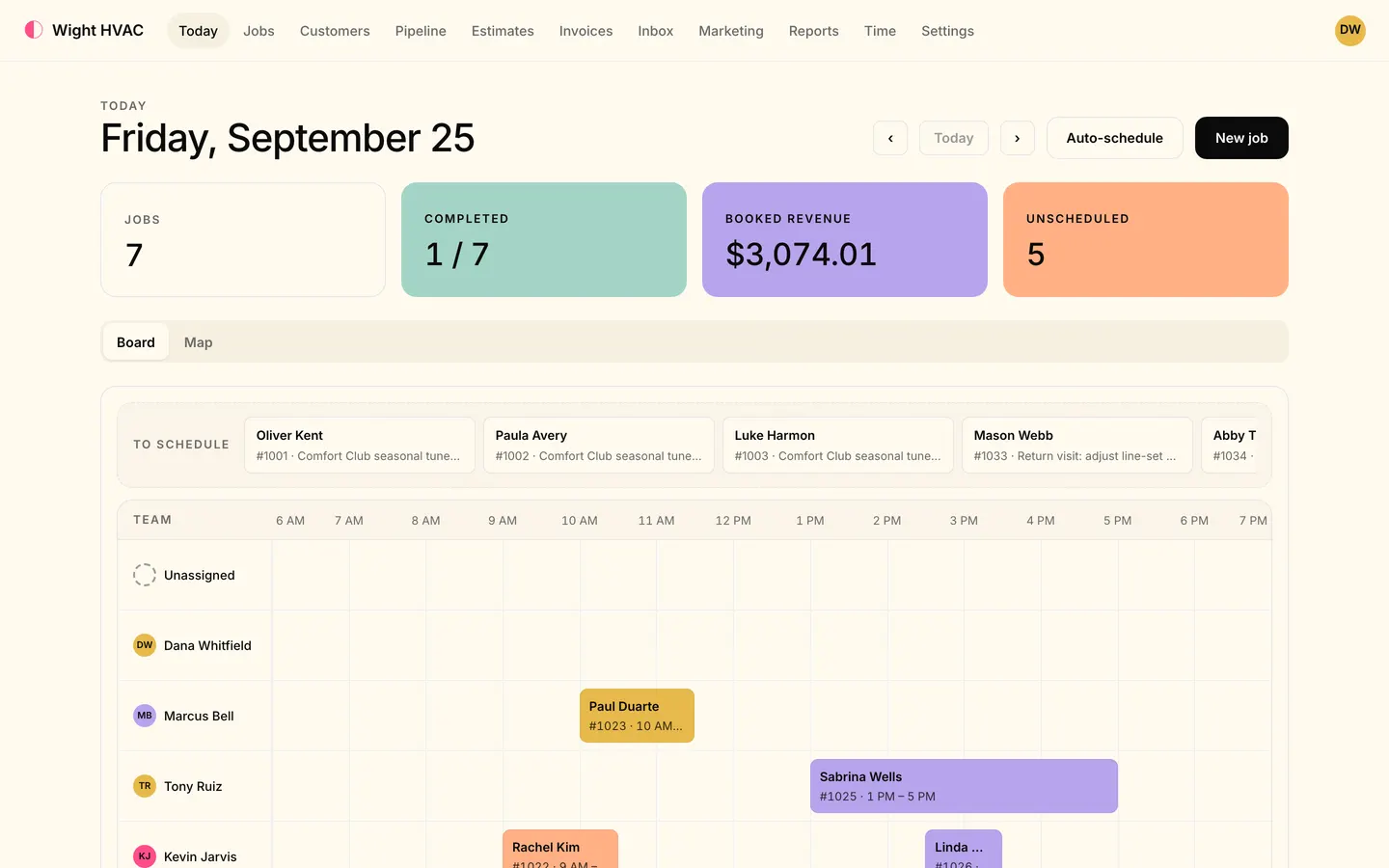
The Tandem office app on Today: the day's jobs, booked revenue and the dispatch board with each technician's jobs.

From first call to final payment.

Read the transcript

You got into contracting to fix things. Not to chase phone calls, paperwork, and payments.

Meet Tandem.

Every lead, from your website, Google, Angi, Thumbtack, or a quick text, lands in one pipeline. Nothing slips through the cracks.

Can't pick up? Your AI receptionist answers calls and texts, day or night, and books the job for you.

Drag jobs onto the board, or hit auto-schedule, and the right tech gets picked by skill and drive time.

When your tech heads out, customers get an on-my-way text, with a live map and arrival time.

Automations chase estimates, ask for reviews, and send campaigns by text, email, even real postcards.

Estimates get signed on the spot. Invoices get paid by card, right from a text. And memberships keep customers coming back.

Tandem. Your field and office, in tandem.
Our mission

Make yours the shop everyone else is measured against.

Tandem is your system: your operations, your customers and your money, run the way the best shops run theirs. Five promises we build every feature around.

  1. Get paid faster.

    Customers pay from a text by card or bank transfer. Take a deposit up front, let reminders chase what's late, and pass card fees on if you choose: up to 3%, never on bank payments.

  2. Get your day back.

    Calls and texts answered and booked while you're on a job, estimates talked into the phone, and a schedule built by skill and drive time.

    AI receptionist on Level · Estimates by voice on Level

  3. Customers who feel looked after.

    On-my-way texts with a live tracking link, estimates they approve and sign on their phone, and messages in English or Spanish.

  4. Everyone on the same page.

    Customer texts, emails and calls in one inbox, and one live schedule the office and the trucks both see.

    Two-way inbox on Crew or Level

  5. Look like the pro you are.

    Professional estimates and invoices, a free website, and a review request after each job.

    Automatic review requests on Crew or Level

Meet Rocky & JamesThe founders · Kiln St. George, Utah
Inside Kiln St. George, the coworking space where Tandem is built
Kiln St. George
1575 South River Road · St. George, Utah 84790

The founders

Two local founders. One text away.

Come see Tandem at Kiln.Send a quick text first so Rocky or James is ready to meet you.

  • Your data stays yours

    Each company's records are kept apart, techs see only their own jobs, and every change records who made it. How we handle security.

  • One flat price

    Pick the plan for your team size. Customers pay invoices through your own Stripe account. See pricing.

  • You stay in charge of the AI

    The receptionist, estimates by voice and the tech assistant each have an owner's switch. The receptionist follows your rules and hands over to a person when it should.

Reach customers across every channel.

Texts, email, saved lists and the tech app all start from the same job record, so every message goes out under your shop's name.

Hartley Electric
(415) 555-0132
Today 8:38 AM
Hi Dana, Hartley Electric here. Mike is about 20 minutes out for your 9:00 AM visit.
Inbox · Dana Hartley
Your kitchen electrical proposal is ready
Hartley Electric · proposals@hartleyelectric.com · Thu 7:12 PM

Hi Dana, thanks for walking me through the kitchen this morning. I've attached the full scope and pricing. The deposit link holds Thursday the 23rd as your start date.

Proposal-1042-Hartley.pdfPDF · Review & sign
Service
Last visit
Customers3 of 7 selected
  • Dana HartleyElectrical · last visit < 6 mo
  • Luis OkaforHVAC · last visit 12 mo+
  • Sam ReyesPlumbing · last visit 6-12 mo
  • Priya NairHVAC · last visit 12 mo+
  • Birch St. DuplexRoofing · last visit 6-12 mo
  • Marcus BellHVAC · last visit 12 mo+
  • Grace LindqvistPlumbing · last visit < 6 mo
Tandem

From your number

Arrival and reminder texts go out under your shop's name, not a short code.

Stops when they reply

A reply pauses the automated texts so a person can pick the thread up.

What it does

Everything between the phone ringing and the money landing.

Every lead, one pipeline.

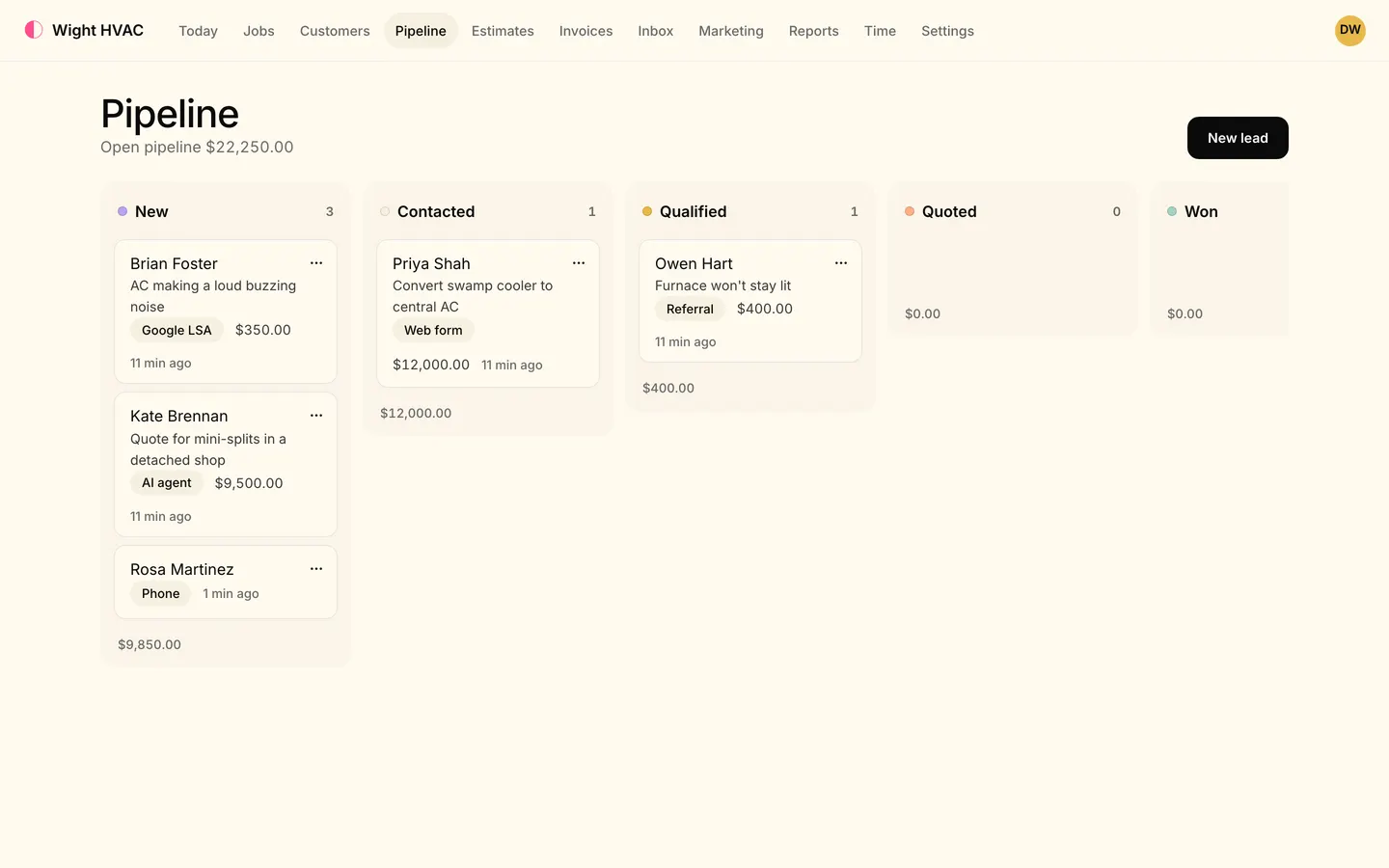
Web forms, calls, texts, your booking page and the marketplaces all land on one board, matched to the customer when we can tell who it is.

  • Drag leads from New to Won, then book the job or draft the estimate in one step
  • Intake links for Google LSA, Angi, Thumbtack, Yelp and Nextdoor (on Crew or Level)
  • Speed-to-lead texts the moment a lead comes in (on Crew or Level)
The Pipeline board: $22,250.00 open, leads in New, Contacted, Qualified and Quoted columns, each card showing the customer, the job, its source (Phone, AI agent, Google LSA, Web form, Referral) and its value.
On Level

Answers when you can't.

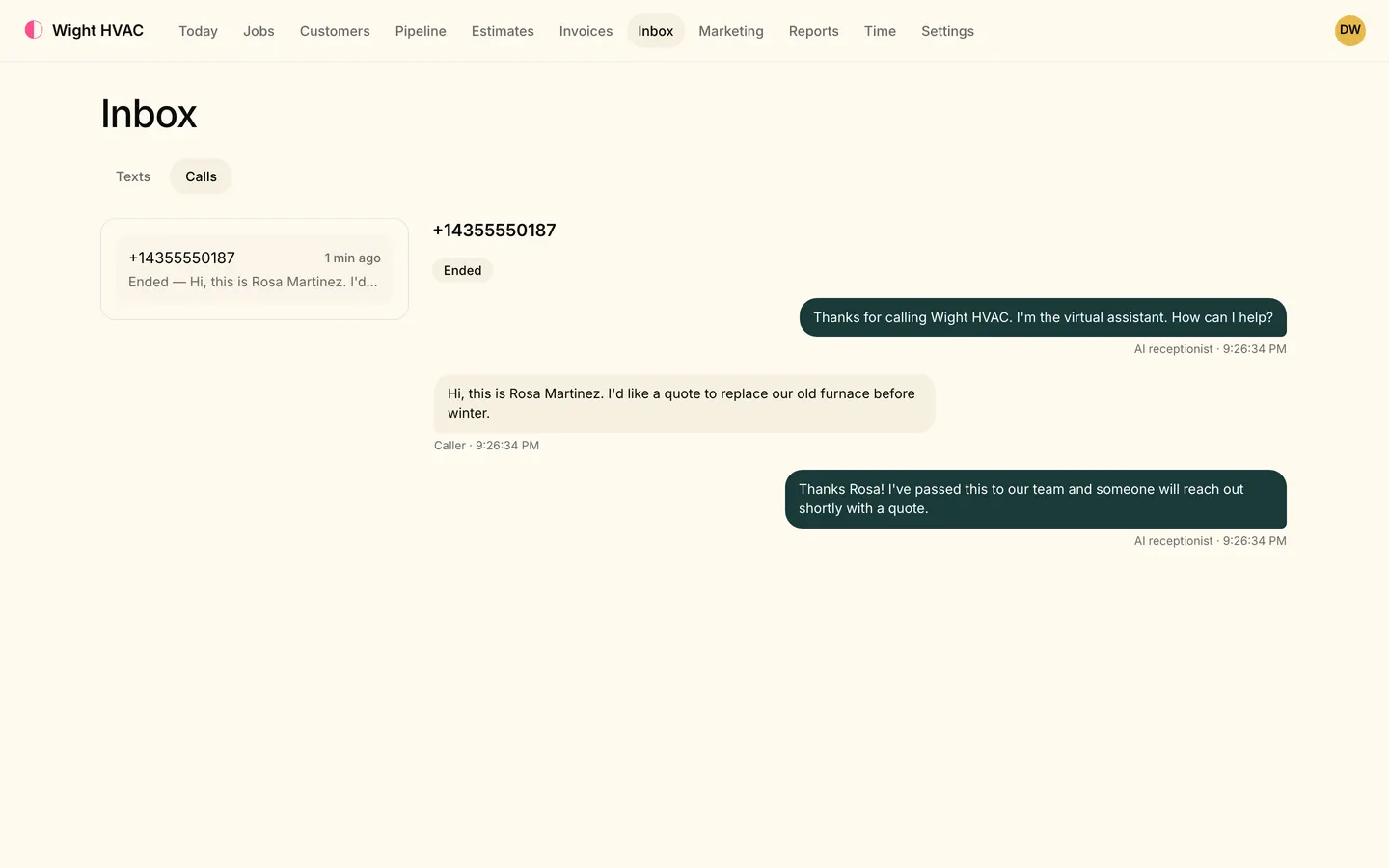
Your AI receptionist picks up calls and texts day or night, answers questions about appointments and invoices, books open times and logs new leads. It hands over to your office when a person should take it.

  • Every call and transcript in your Inbox
  • Books into real open times on your schedule
  • Turn it on or off whenever you like
Inbox, Texts tab: Jenna Ellis texts that the furnace bangs when it kicks on and asks for Tuesday; the AI receptionist offers 7:00–9:00 or 9:00–11:00 AM, Jenna picks 9:00, and it replies 'You're all set! You're booked for Tue, Oct 13, 9:00–11:00 AM.'

Drag. Drop. Done.

Put jobs on the board by dragging them into a tech's lane, or let Auto-schedule pick the right tech and time by required skills, drive time, workload and due dates, with its reasons shown.

  • Live board: everyone sees changes as they happen
  • Double-booking warnings that name the clash
  • Recurring jobs, multi-day jobs and crews
Today in the office app: 17 jobs on the day's board, 4 completed, $8,204.01 booked and 5 unscheduled, a To schedule tray and the dispatch board with each technician's jobs laid out by hour.

They'll know you're coming.

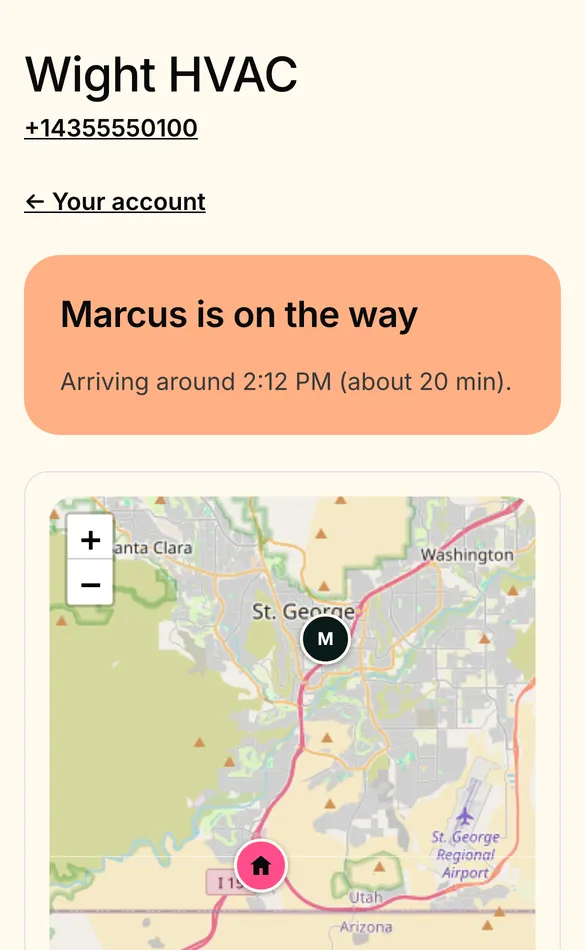
When your tech heads out from the tech app, the customer gets a text with a live map and an arrival time worked out from the drive.

  • Confirmations, day-before reminders and reschedule notices
  • Office map of the day's jobs and techs
  • Works on any phone, no app for the customer
A customer's phone: 'Kevin is on the way, arriving around 4:30 PM (about 5 min)' with Call and Text buttons, above a live map showing the technician and the service address.
On Crew or Level

Follow-ups that run themselves.

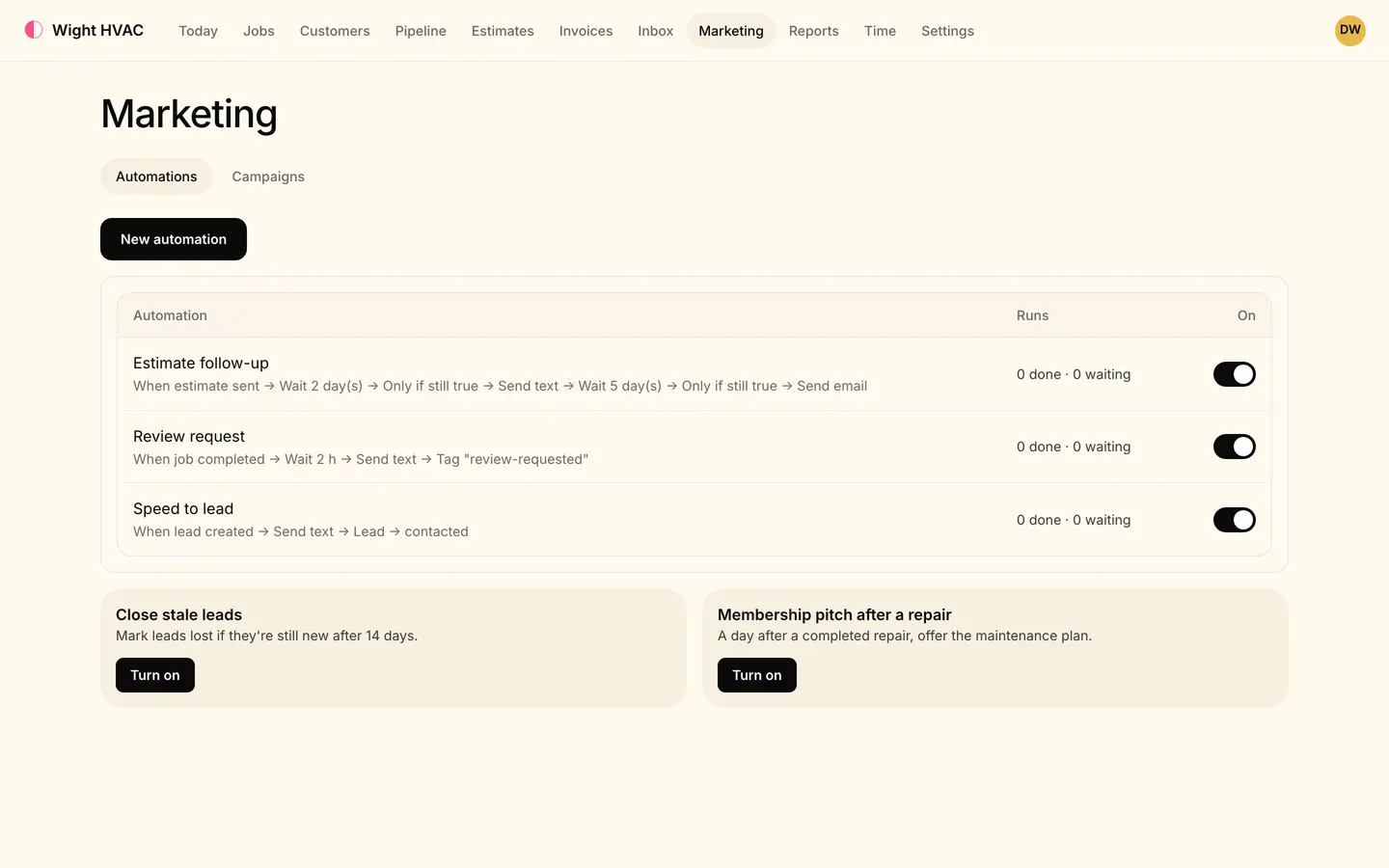
Automations chase estimates, ask for reviews after a job and text new leads back. Campaigns go out by text, email or printed postcard to the customers you pick.

  • Ready-made estimate follow-up, review request and speed to lead
  • Opt-outs honored automatically (STOP and one-click unsubscribe)
  • See deliveries, replies and bookings per campaign
Marketing, Automations tab: Estimate follow-up, Review request and Speed to lead automations switched on, with their steps written out, and templates to close stale leads and pitch a membership.

Get paid from a text.

Send good/better/best estimates customers can approve and sign on their phone, take a deposit, and invoice when the job's done. Customers pay by card or bank transfer from the link, tip included.

  • E-signature with deposits credited on the final bill
  • Overdue reminders on the days you choose
  • Memberships that renew and bring customers back
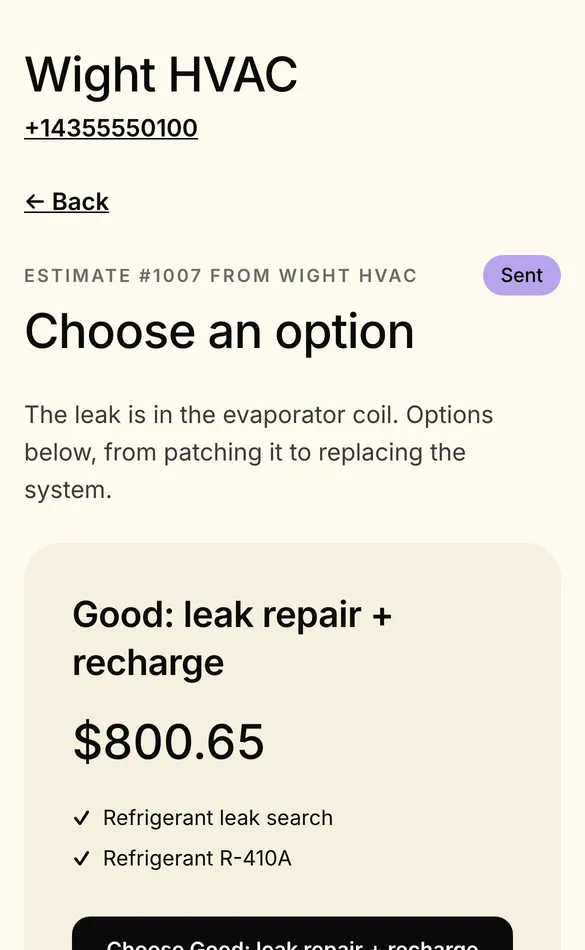
A customer's phone showing estimate #1003 from Wight HVAC, Choose an option, starting with Good: leak repair and recharge for $800.65.
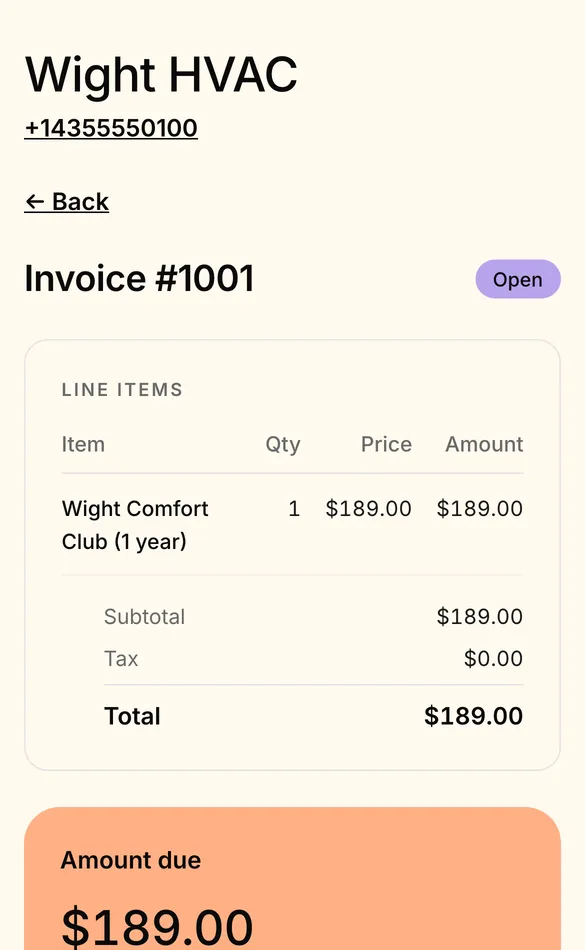
A customer's phone showing invoice #1011 with $1,466.63 due, tip options (no tip, 10, 15 or 20%), Pay by card and Pay from bank account.

Built to connect

Keep the tools you already know.

Your books, payments and texts stay where they are. Tandem connects to them, and to the AI apps you already use.

MCP connector for Claude & ChatGPT
  • QuickBooks (works today)
  • Stripe (works today)
  • Twilio (works today)
  • Claude (works today)
  • ChatGPT (works today)
  • Zapier (works today)
  • HubSpot (coming soon)
  • Square (coming soon)
  • Google Sheets (coming soon)
  • Dropbox (coming soon)

QuickBooks sync is on Crew or Level; the AI apps connector is on Level.

The tech app

The office, in every truck.

Your techs get the day, the job, the price book and the paperwork on their phone. What they do reaches the office as soon as the phone has signal.

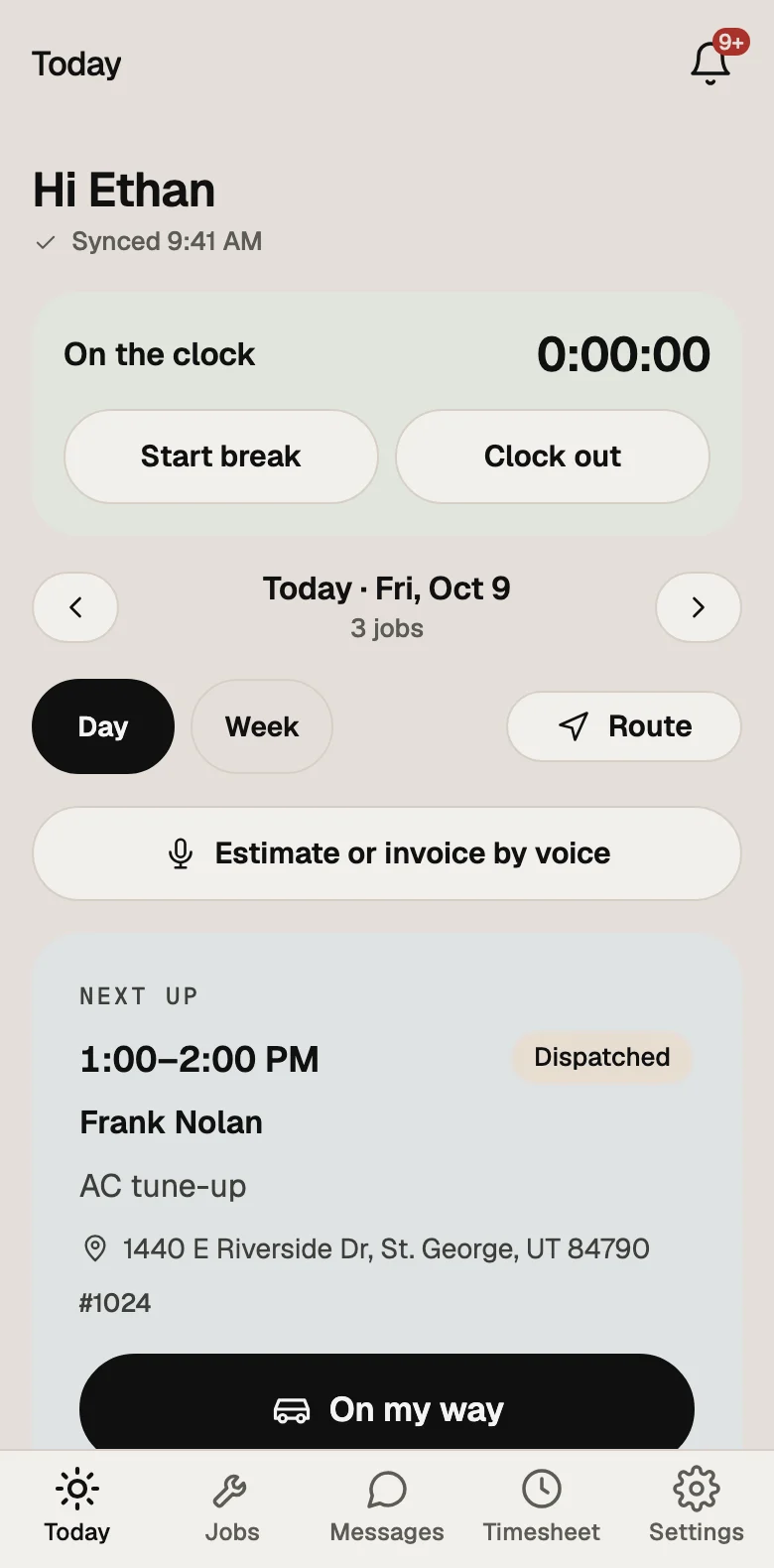
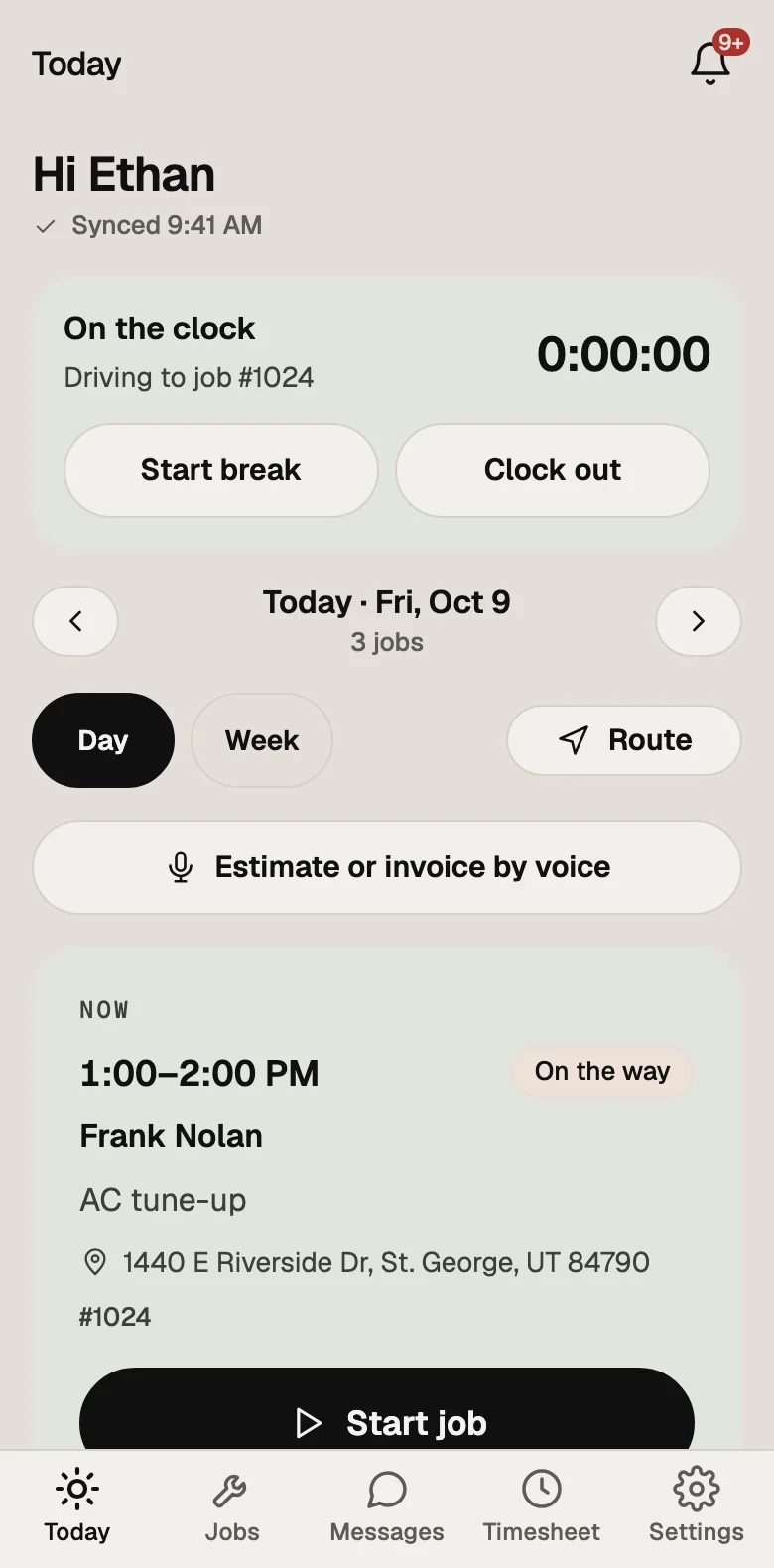
The tech app's Today screen: on the clock, three jobs on Friday, and next up Frank Nolan's AC tune-up from 1:00 to 2:00 PM with an On my way button
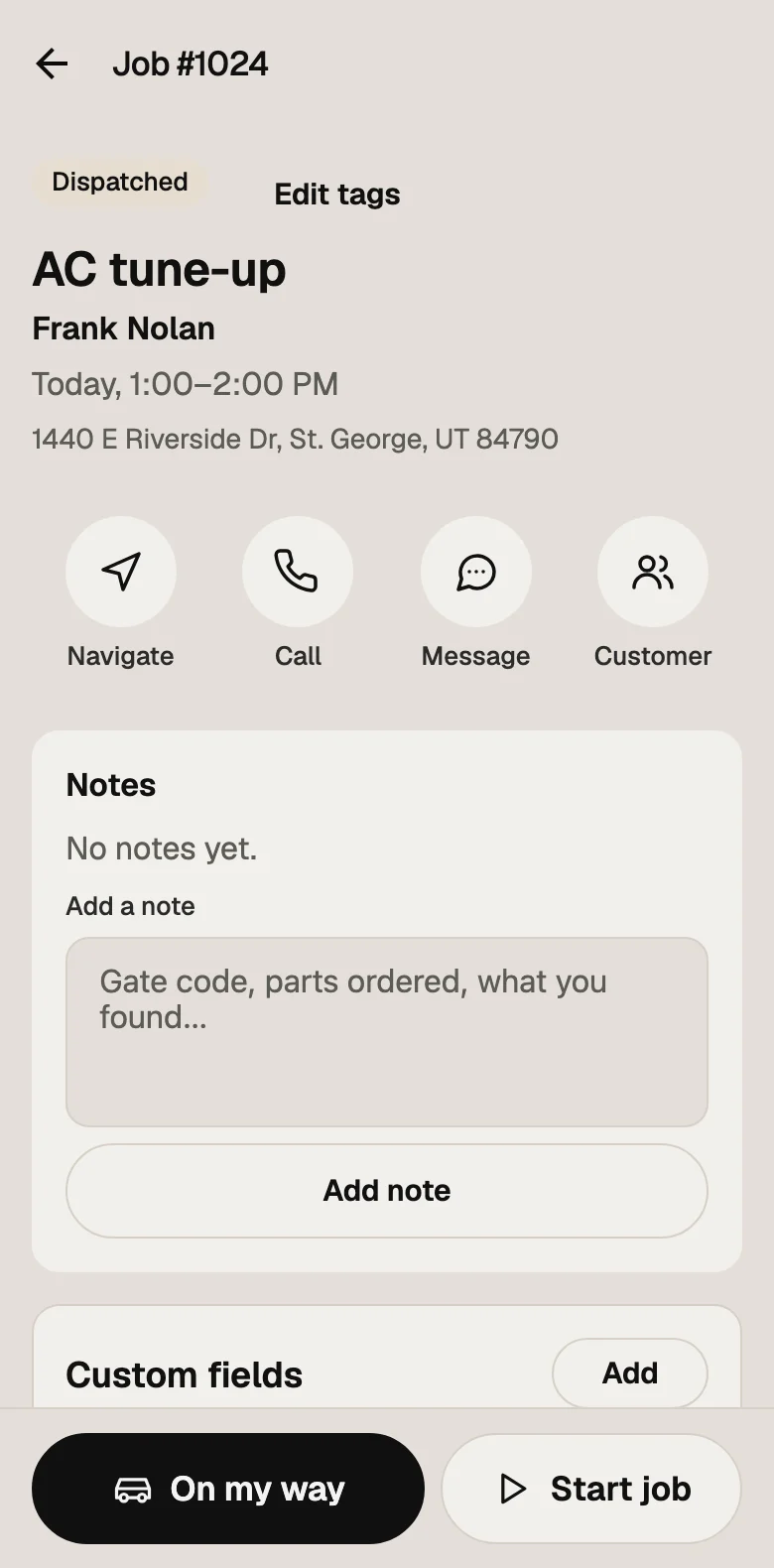
Job #1024 in the tech app: Frank Nolan's AC tune-up and address, buttons to navigate, call or message, and the job's notes
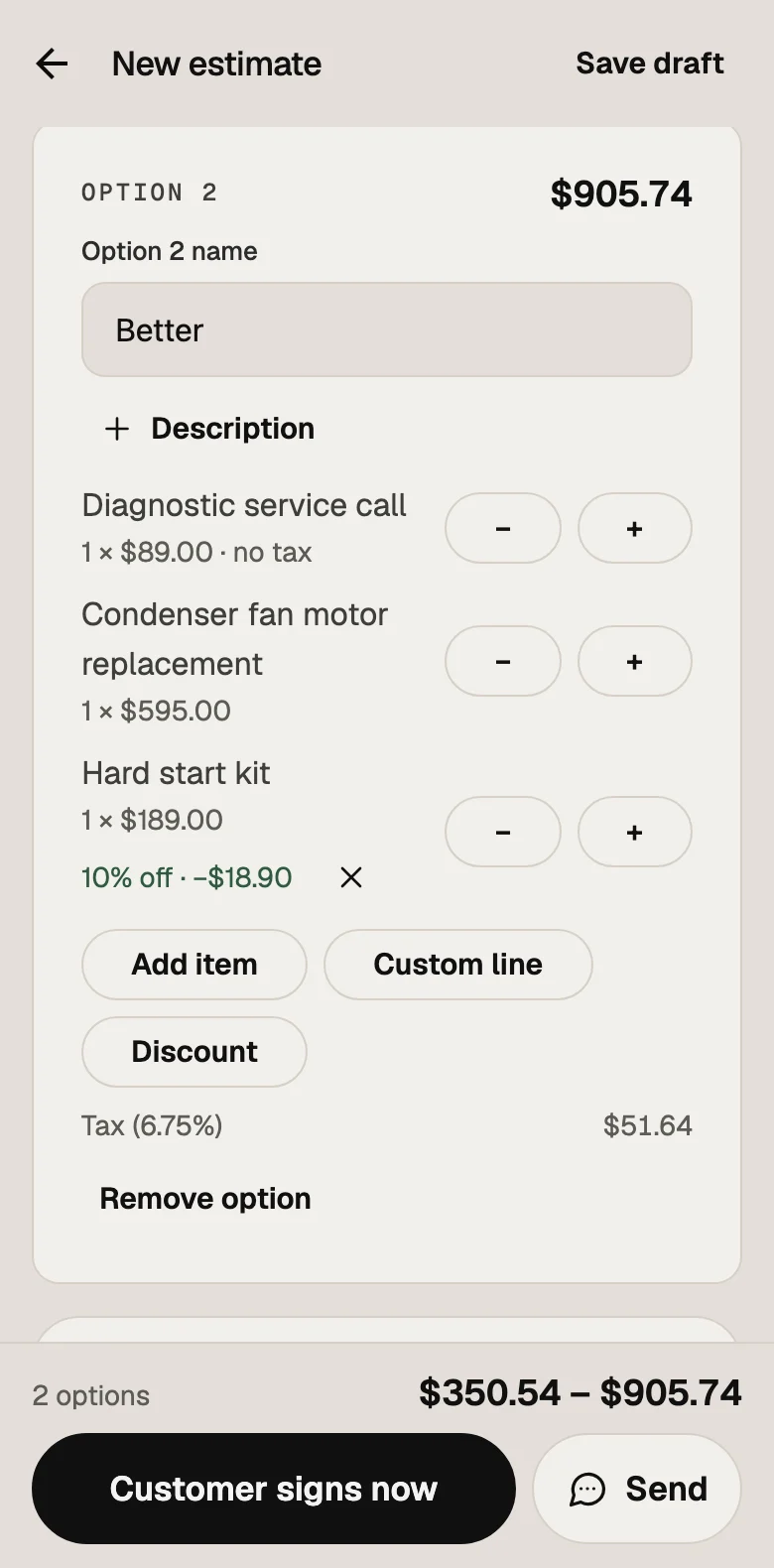
An estimate draft in the tech app: option 2, Better, with three price-book lines and 10% off the hard start kit
The Today screen after On my way: job #1024 shows On the way and the clock shows Driving to job #1024
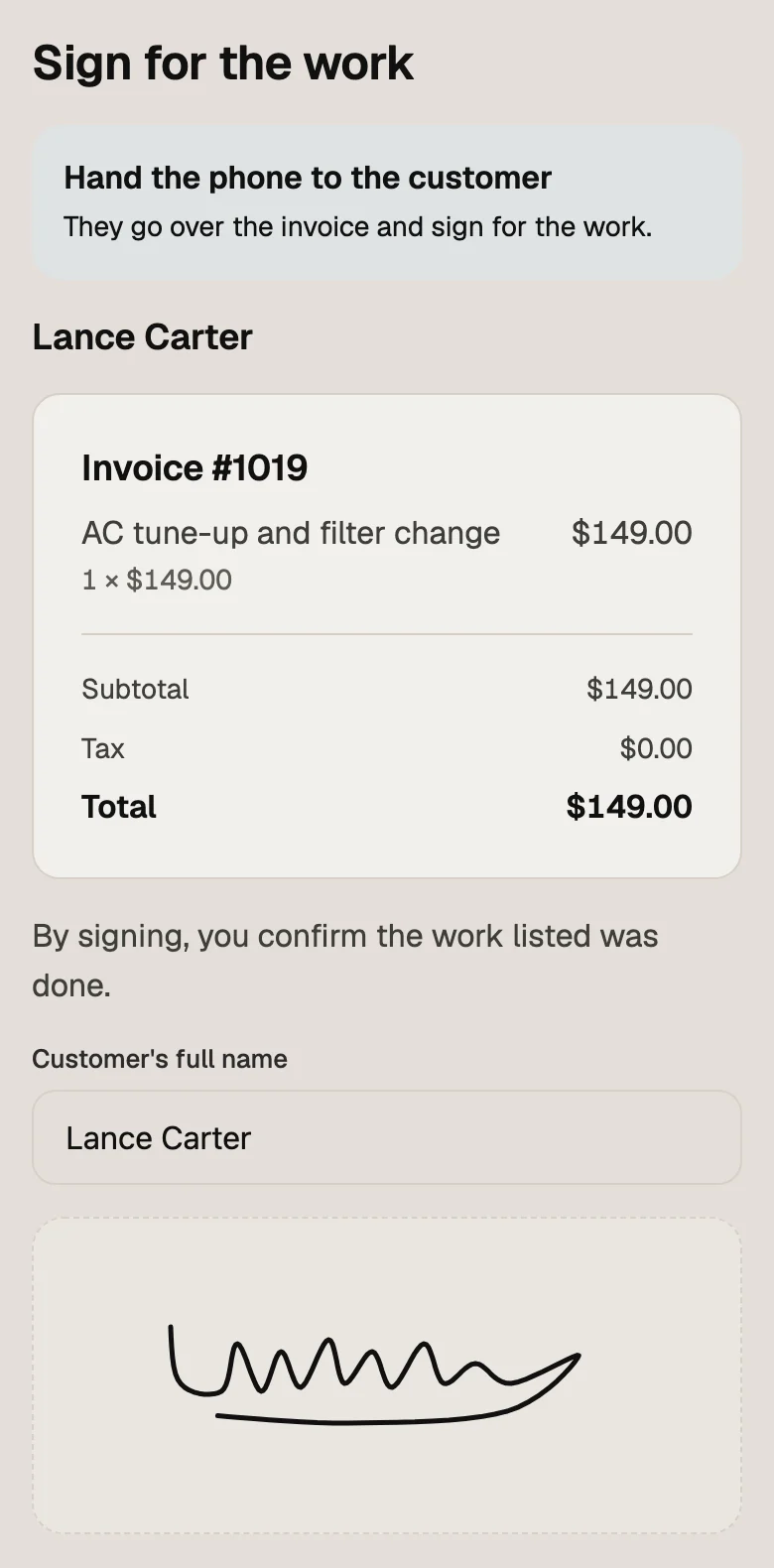
Sign for the work in the tech app: invoice #1019, an AC tune-up and filter change for $149.00, with Lance Carter's name and signature
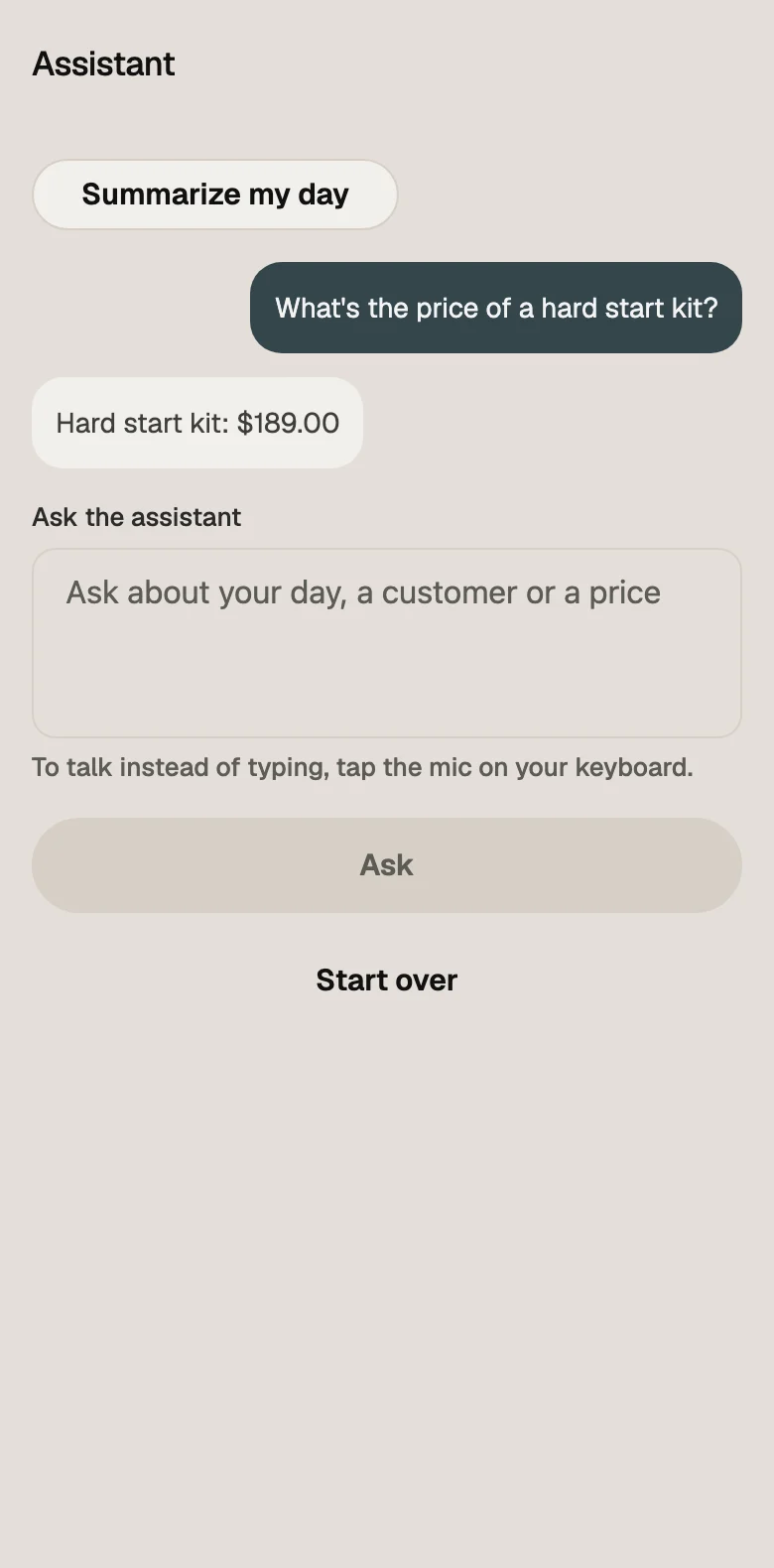
The assistant in the tech app answering "What's the price of a hard start kit?" with $189.00

Screens from the Tandem tech app, with demo data.

Sent as

FromRidgeline Plumbing via Tandem

Dana from Ridgeline Plumbing would love your review

Ridgeline Plumbing

Dana from Ridgeline Plumbing would love your review.

Reply to this email to reach Ridgeline Plumbing.Ridgeline Plumbing via Tandem

Get more reviews. Asked by the tech who did the work.

Built in:

  • Asked by the tech from the job, credited to them
  • By text and email, whichever the customer has
  • Each customer asked at most once every 30 days
  • Who asked and whether the link was opened, on the job page

Prefer it automatic? The ready-made Review request automation texts two hours after a job is completed, unless someone has already asked.On Crew or Level

How it works

Up and running this week.

  1. Start your trial

    Sign up with your email. 14 days free, no card.

  2. Bring your shop over

    Import customers and your price book from Housecall Pro, Jobber or a spreadsheet, then invite your techs.

  3. Run a job end to end

    Estimate, signature, on-my-way text, invoice, paid.

See it in a minuteWatch the 60-second tourFrom the first call to the final payment, with captions.

Switching

Switching from Housecall Pro or Jobber? Bring your history with you.

Export your customers and price book as CSV or Excel and import them under Settings → Import, on every plan. The trial needs no card, so you can run a week of real jobs alongside your current software.

Comes over:

  • Customers and your price book, from a CSV or Excel export
  • Past jobs, estimates, invoices and payments, each matched to its customer
  • Their dates, amounts and old number, so you can still find job #2041

Safe by default:

  • You see every row, and any customer you already have, before anything is saved
  • No texts, emails or charges go to your customers
  • Nobody is opted into marketing unless your file says they agreed
  • A finished import can be undone while nothing has been done with its records

Always on

Your business, running while you're on the job.

Your system answers, books, estimates and reports while you work. It's powered by AI, follows your rules and hands over to a person when it should.

AI receptionist

On Level

Every call answered

Answers the calls and texts you miss, books the visit and logs the lead.

Texts back in your customer's language. Calls are in English for now.

Estimates by voice

On Level

Estimates while you talk

Your tech says what the job needs; the estimate is built from your price book.

Prices always come from your price book.

Office assistant

Answers about your numbers

Ask about your business in plain words.

In Reports, under “Ask about your business”

It only reads what you can already see, and changes nothing.

Claude & ChatGPT

On Level

Work from the AI app you use

Work in Tandem from the AI app you already use.

Changes are made with your own sign-in and permissions.

Plans & questions

Straight prices. Straight answers.

The things people ask before they start a trial, answered the way we would across the counter.

  • Solo

    $59/month

    For the owner-operator. 1 person included.

  • Crew

    $149/month

    For a growing team. 5 people included.

  • Level

    $299/month

    For the shop that runs on the level. 15 people included.

Every plan starts with a 14-day free trial. Pay yearly and get two months free.

More people or more locations? Enterprise: talk to us.

Compare plans

Still have a question?

Rocky runs customer support. Text or call him directly and he writes back himself.

Text us

Or email rocky@haestus.dev

How does the free trial work?

You get 14 days with everything in the plan you pick, and you don't need a card to start. If you don't choose, your trial is on Crew.

Compare the plans

Is there an app for my techs?

Yes. The tech app shows each technician their own jobs for the day, lets them clock in and take breaks, head out (which texts the customer), start and finish jobs, take photos, fill in checklists, build estimates and get them signed on the spot, and take payments. It keeps working without signal and sends everything once it's back online.

How is my data kept safe?

Every company's records are kept apart and every request is checked against the company it belongs to. Passwords are stored as salted one-way hashes, two-step sign-in is built in (and you can require it for your whole team), you can see and end every session, and every change records who made it.

How we handle security

Can I bring my customers over?

Yes. Export your customer list and price book from Housecall Pro or Jobber as CSV or Excel files and import them under Settings → Import, on every plan. We recognize both apps' columns, show you every row before anything is saved, and check for customers you already have (skip them, merge them or add them anyway). Then bring over past jobs, estimates, invoices and payments the same way: each is matched to its customer and keeps its dates, amounts and old number. Importing never texts, emails or charges your customers, and nobody is opted in to marketing unless your file says they agreed.

All questions and answers

More jobs. Paid faster.

Try it on your next job, with your own customers and your own price book.

  • 14-day free trial
  • No card needed
  • Bring your customers from Housecall Pro or Jobber